Paramount Students (Behance case study)
Designing a student housing app and website for people choosing a room they can't visit first.
A room you can't visit first
Paramount Students helps students find accommodation near their university. The brief centred on two students: an 18-year-old leaving home for the first time, and an international graduate student arriving in a country they don't know. Both have to choose a room without seeing it, so the screens had to do the job a viewing normally does.
I joined Paramount as a UI/UX design intern and owned the visual direction and every high-fidelity screen, for the app and the website. Shaimaa Saleh, a UX design intern, led the research, user flows and wireframes. I reviewed the direction with her and Wajahat, our senior product designer, and with the mobile developer as each module was built.
Photos first, then the facts
A student comparing rooms from abroad is judging places they've never stood in, so the visual direction started with the photographs. Every listing leads with a photo of the room, and the interface around it stays quiet: white surfaces, one typeface and dark text.
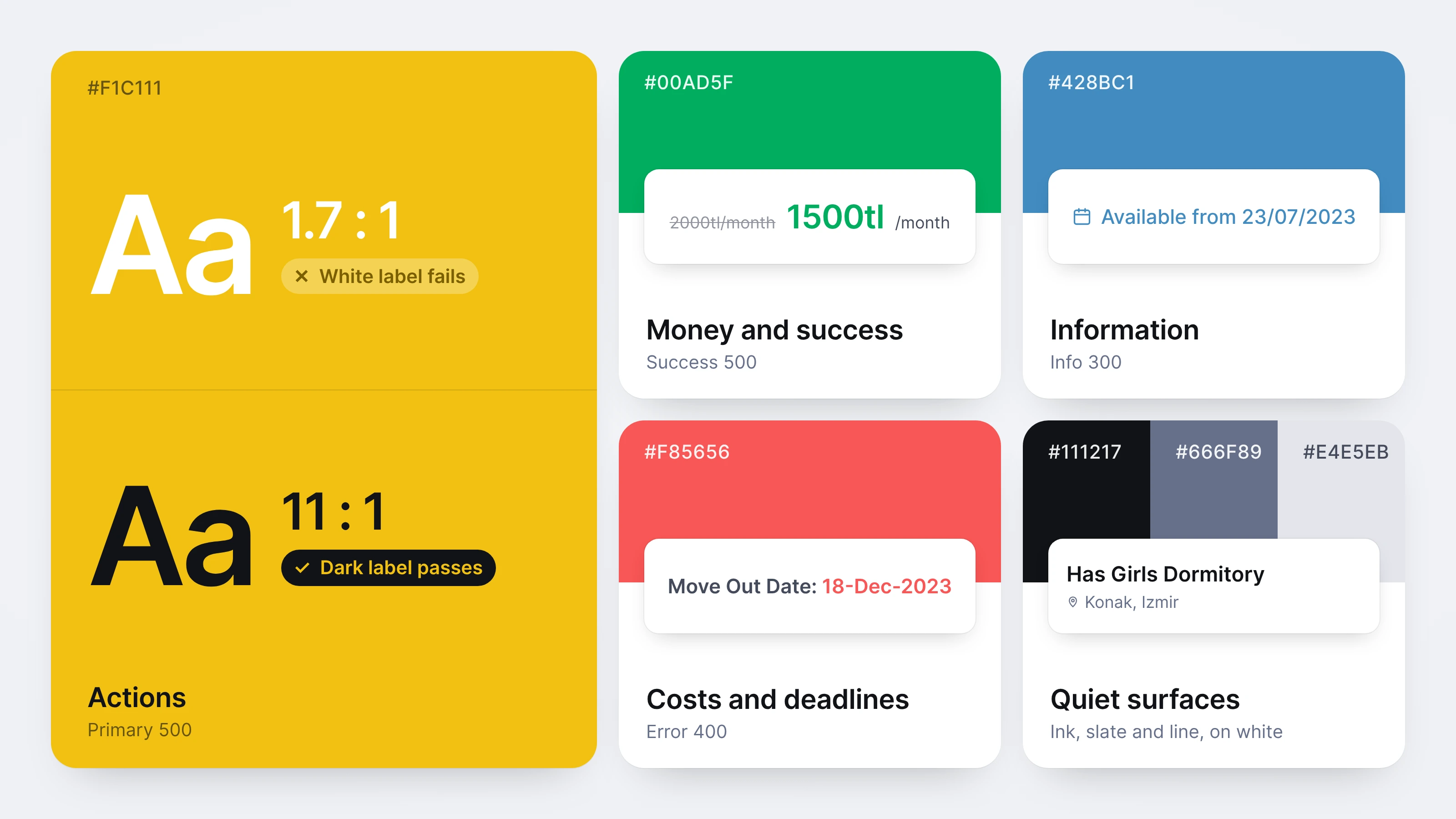
Paramount already had its brand, a bright yellow, so my job was to make it work on screen. White labels, the usual pairing on a strong brand colour, measure 1.7:1 on this yellow, far below the accessibility minimum. So yellow never carries text. It fills the main actions, with dark labels at 11:1, and the other meanings get their own colours: green for money, blue for information, red for deadlines. The cost is a brand that shows up less than a yellow-first design would allow, but every action stays readable.
The style guide
Every screen that follows draws on one style guide. It runs from the foundations (colours, shadows, typography and icons) through the building blocks (buttons, input fields and flags) to 42 components assembled from them. I ordered it the way the app is built, so the developer could trace any component back to the colours, type and icons it uses.
From wireframe to final screen
Shaimaa's wireframes set out the flows and what each screen had to hold. My job was to decide what each screen should make obvious at a glance.
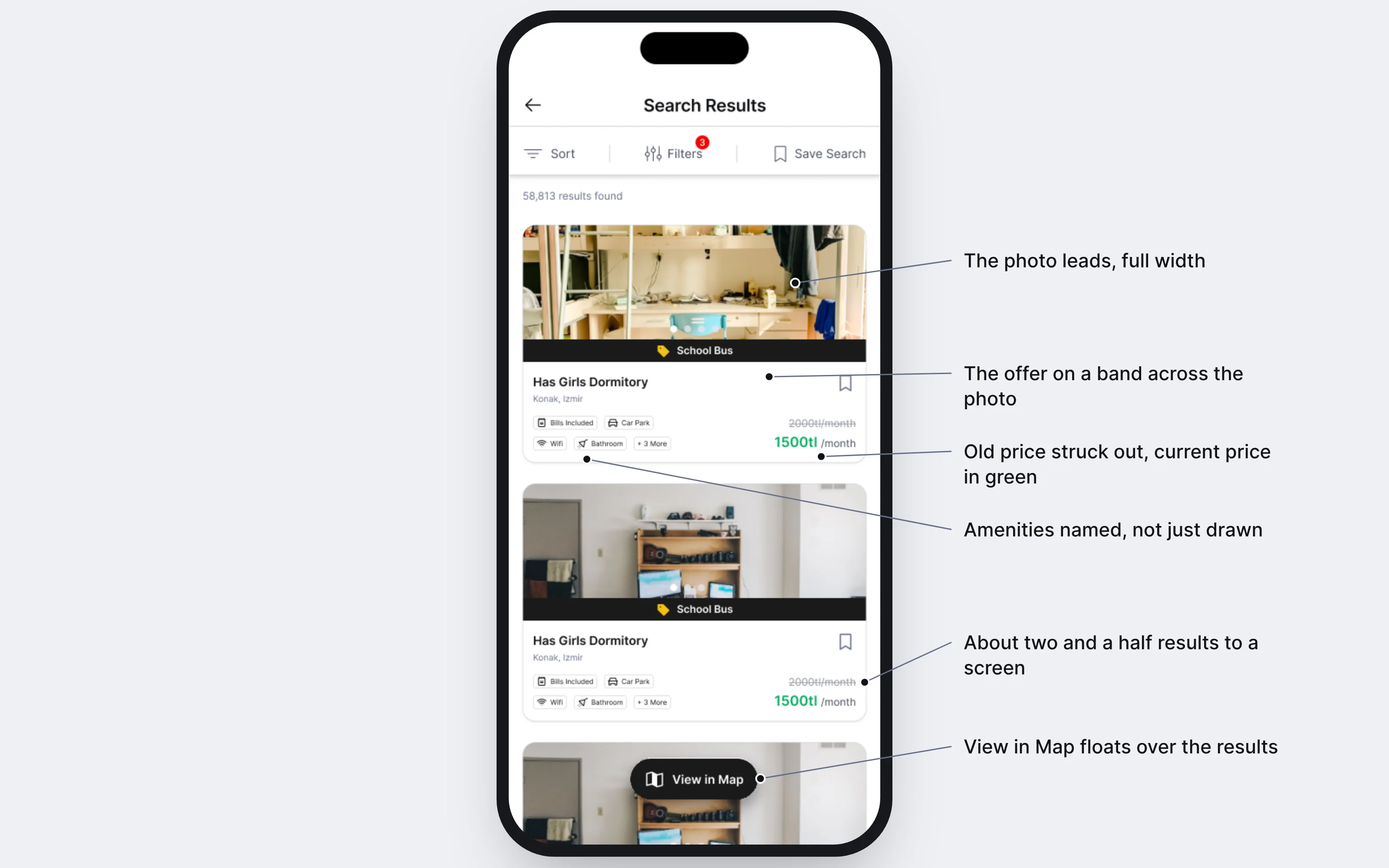
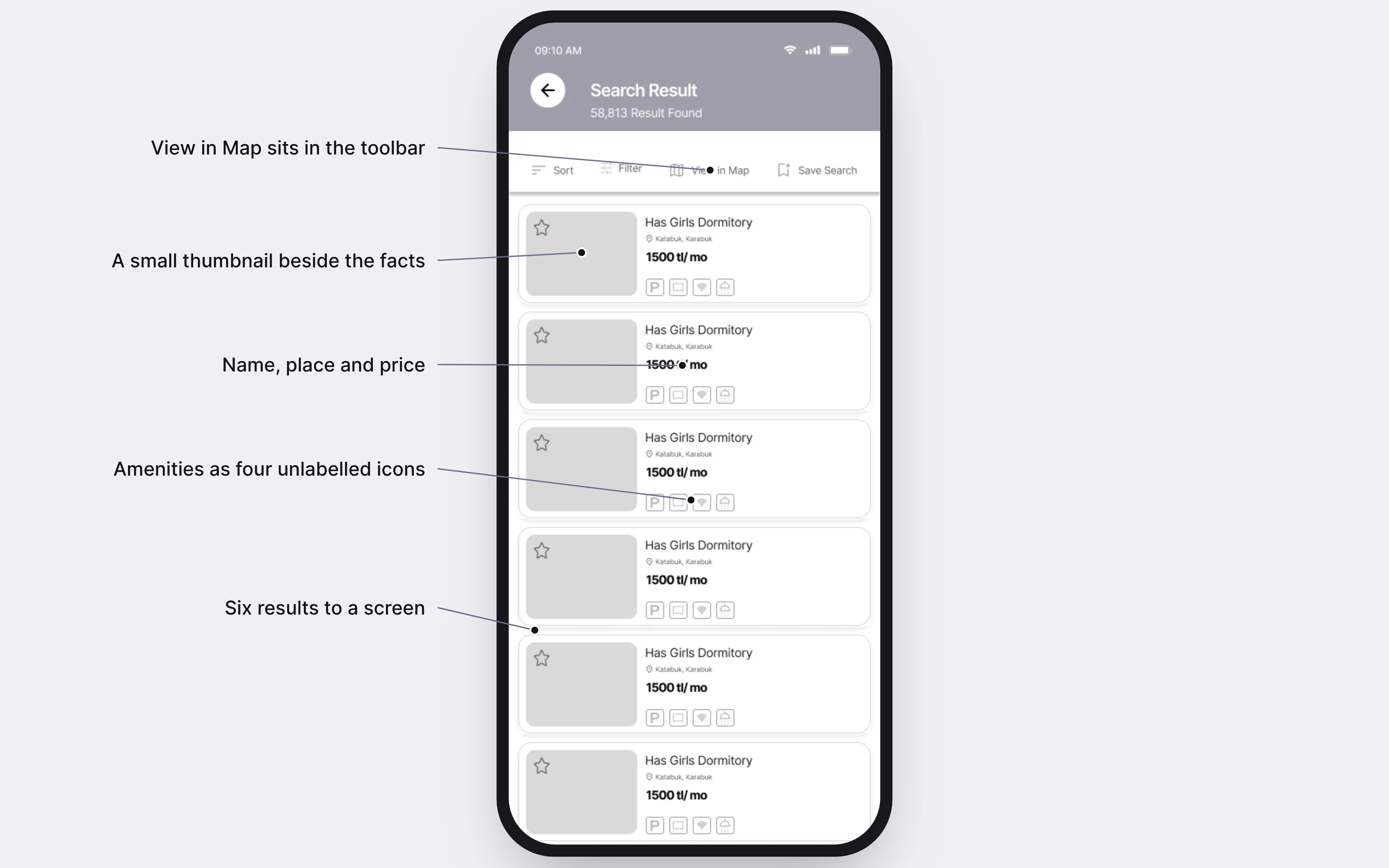
In the wireframe, each search result was a small row: a thumbnail beside the name, the place, the price and four unlabelled icons. In the final card, the photo runs the full width, an offer sits on a band across it, the old price is struck through beside the current one in green, and the amenities are named, not just drawn. The cost is height: the wireframe fits six results on a screen, the final design about two and a half. I accepted more scrolling, because opening every listing to find out what it includes costs a student more.
Trust, both ways
A student pays for a room they haven't seen, and an owner hands it to someone they haven't met. The screens after search give each side a way to check the other: the student can ask the owner anything before booking, and the student's profile carries a verified phone number and a letter from their university.
Booking asks a student to pay for a room they've never seen, often from another country, so I designed it around certainty. Three numbered steps show how far there is to go. Availability is confirmed before any payment, every charge is listed before Pay, and the last screen says the money won't be taken until the owner approves. Checking first adds a step, which I accepted, so nobody pays for dates that aren't free.
The parts nobody sees
Nobody shows off a login form or an error screen, but they're where an app most often feels unfinished. I designed them in the same language as everything else, and every dead end, from a wrong password to a dropped connection, offers a way forward.
One look across the app and the website
The website was built from the app, not beside it: the same content in the same order, so a student moving between them has nothing to relearn. Only the layout changes where a bigger screen helps: three results to a row instead of one, and the price and Request Booking beside the dorm details instead of pinned to the bottom. The cost is two layouts of every page to keep in step, which mattered later.
Looking back
The app launched on the App Store in 2024. Wajahat, my manager, was happy with the work, especially how I'd structured the style guide, and Paramount hired me full time. My new role was in design operations: designing one design system across Paramount Students' products.
What I’d do differently
As an intern, I treated each screen as the finished piece and relied on reviews to tell me what was missing. Rebuilding the flows for this case study, the gaps showed up between screens: a date, a price or a result count that had to agree from one step to the next. Next time I'd design each flow end to end, with the same sample data running through it, before polishing any single screen.